Jabra Elite 65t Manual | How to Pair / Connect?
Jabra Elite 65t Manual | How to Pair / Connect?

To iOS and Android phones
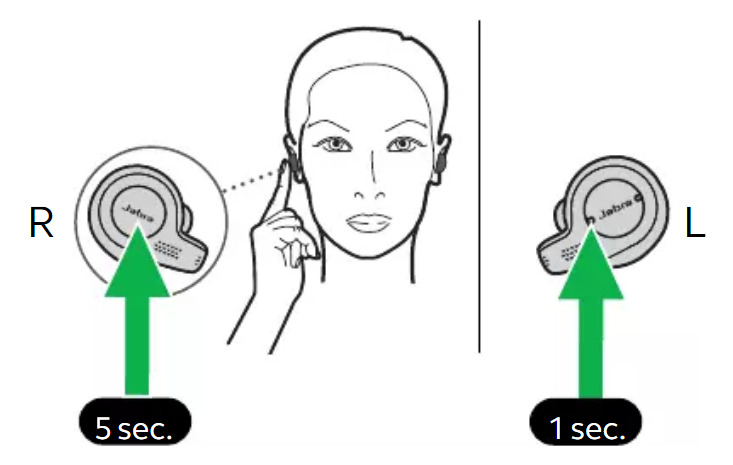
Step 1: Make sure the right earbud is turned off and not in the charging case. To manually turn off the earbud, hold the multifunction button until a light flashes red.
Step 2: Press and hold the multifunction button on the right earbud for 5 seconds until you hear the connection instructions in the earbud, and a light flashes blue.
Step 3: Release the button, and follow the voice-guided instructions to pair to the device.
Step 4: Turn on the Bluetooth on the desired device.
Step 5: Go to the Bluetooth settings.
Step 6: Select “Select “Jabra Elite 65t”. If a password is needed, type “0000”.
Step 7: After that, a blue light will turn on and flash slowly, and the pairing will be done.
To PC (Windows)
Step 1: Turn on Window’s Bluetooth.
Step 2: Go to the settings.
Step 3: Go to “Bluetooth and other devices”.
Step 4: Click on “Add device”.
Step 5: Click on Bluetooth.
Step 6: Make sure the right earbud is turned off and not in the charging case. To manually turn off the earbud, hold the multifunction button until a light flashes red.
Step 7: Press and hold the multifunction button on the right earbud for 5 seconds until you hear the connection instructions in the earbud, and a light flashes blue.
Step 8: Release the button, and follow the voice-guided instructions to pair to the device.
Step 9: Select “Jabra Elite 65t”. If a password is needed, type “0000”.
Step 10: After that, a blue light will turn on and flash slowly, and the pairing will be done.
https://www.thephonetalks.com/
Comments
Post a Comment